Tuesday, July 22, 2014

Oracle Business Intelligence Applications 11.1.1.8.1 - Notes when setting up the Data Lineage

When setting up Data Lineage on Oracle Business Intelligence Applications 11.1.1.8.1 as document (http://docs.oracle.com/cd/E51479_01/doc.111181/e51483/datalineage.htm#CDEDDIGA), you may get some errors like below:

ODI-1217: Session DATALINEAGE_ETL_SDE_DL_OBIEE_BMM_HIERARCHY (44440500) fails with return code 7000. 
IOError: (2, 'ENOENT', 'E:\\software\\obiee\\Oracle_BI1\x08iapps\\DataLineage/rpd_text.txt') 

ODI-1217: Session DATALINEAGE_ETL_SDE_DL_OBIEE_SQL_PARSER (44447500) fails with return code 7000. 
IOError: (2, 'ENOENT', 'E:\\software\\obiee\\Oracle_BI1\x08iapps\\DataLineage/sql_query_list.txt') 

ODI-1217: Session DATALINEAGE_ETL_SDE_DL_FUSION_METADATA_EXTRACT (44543500) fails with return code 7000. 
OSError: [Errno 0] No such directory: 'E:\\software\\obiee\\Oracle_BI1\x08iapps\\DataLineage' 

ODI-1217: Session DATALINEAGE_ETL_SDE_DL_FUSION_TEMPORARY_LOAD (44703500) fails with return code 7000. 
ODI-1226: Step SDE_DL_FUSION_AM_Extract_Temporary.W_FUSION_PILLAR_AM_TMP fails after 1 attempt(s). 
ODI-1240: Flow SDE_DL_FUSION_AM_Extract_Temporary.W_FUSION_PILLAR_AM_TMP fails while performing a Loading operation. This flow loads target table W_FUSION_PILLAR_AM_TMP. 
ODI-1227: Task SrcSet0 (Loading) fails on the source FILE connection BIAPPS_DW_FILE. 
Caused By: java.sql.SQLException: ODI-40438: File not found: E:\software\obiee\Oracle_BI1\biapps\etl\data_files\src_files\BIA_11/AM_List.dsv 

ODI-1217: Session DATALINEAGE_ETL_SDE_DL_ODI_INTERFACE_HIERARCHY_DERIVE (44798500) fails with return code 7000. 
ODI-1226: Step INTERFACE_HIERARCHY fails after 1 attempt(s). 
ODI-1232: Procedure INTERFACE_HIERARCHY execution fails. 
Caused By: org.apache.bsf.BSFException: exception from Jython: 
Traceback (most recent call last): 
File "<string>", line 1, in <module> 
File "<string>", line 158, in process_interface_hierarchy 
IOError: (2, 'ENOENT', '$ORACLE_BI_HOME/biapps/DataLineage/adaptor_list.txt') 

ODI-1217: Session DATALINEAGE_ETL_SIL_DL_COMMON_INTERFACE_HIERARCHY_FACT (44799500) fails with return code 7000. 
ODI-1226: Step SIL_DL_COMMON_Interface_Hierarchy_Fact.W_INTERFACE_HIERARCHY_F fails after 1 attempt(s). 
ODI-1240: Flow SIL_DL_COMMON_Interface_Hierarchy_Fact.W_INTERFACE_HIERARCHY_F fails while performing a Loading operation. This flow loads target table W_INTERFACE_HIERARCHY_F. 
ODI-1227: Task SrcSet0 (Loading) fails on the source FILE connection BIAPPS_DW_FILE. 
Caused By: java.sql.SQLException: ODI-40438: File not found: E:\software\obiee\Oracle_BI1\biapps\etl\data_files\src_files\BIA_11/interface_hierarchy_output.txt 

ODI-1217: Session DATALINEAGE_ETL_SIL_DL_COMMON_ETL_SUMMARY (44804500) fails with return code 7000. 
ODI-1226: Step SIL_DL_COMMON_ETL_SUMMARY.W_ETL_SUMMARY_F fails after 1 attempt(s). 
ODI-1240: Flow SIL_DL_COMMON_ETL_SUMMARY.W_ETL_SUMMARY_F fails while performing a Loading operation. This flow loads target table W_ETL_SUMMARY_F. 
ODI-1227: Task SrcSet0 (Loading) fails on the source FILE connection BIAPPS_DW_FILE. 
Caused By: java.sql.SQLException: ODI-40438: File not found: E:\software\obiee\Oracle_BI1\biapps\etl\data_files\src_files\BIA_11/lineage_summary.txt 


If you have got one of those, please ensure that some following configurations had been done (I tried and the 'Data Lineage Extract and Load' load plan ran successfully):

- Use / instead of \ when setting DL_HOME variable on the Data Lineage Exract and Load load plan
- Copy APP-INF from $ORACLE_BI_HOME/fsm/modules/oracle.setup/SetupLite.ear to $ORACLE_BI_HOME/biapps/DataLineage
- Update config of BIAPPS_DW_FILE, change directory from $ORACLE_BI_HOME/biapps/etl/data_files/src_files/BIA_11 to $ORACLE_BI_HOME/biapps/DataLineage (same with the value set for the DL_HOME variable on the Data Lineage Exract and Load load plan.
- Copy all source files from $ORACLE_BI_HOME/biapps/etl/data_files/src_files/BIA_11 to $ORACLE_BI_HOME/biapps/DataLineage
- Enable SDE_DL_OBIEE_BMM_HIERARCHY & SDE_DL_FUSION_METADATA_EXTRACT step in the Data Lineage Exract and Load load plan (they are disabled by default). Disable SDE_DL_ODI_MAPPING_LIST_WIDS step if it is enabled (disabled by default, enabling it will caused SDE_DL_ODI_INTERFACE_HIERARCHY_DERIVE step runs for a long time)
Tin Dang

Wednesday, June 11, 2014

Install OBI 11g on Linux

Cần cài đặt các packages sau đây cho hệ điều hành trước khi tiến hành các bước tiếp theo:
  • GNOME Desktop Environment
  • Editors
  • Graphical Internet
  • Text-based Internet
  • Development Libraries
  • Development Tools
  • Server Configuration Tools
  • Administration Tools
  • Base
  • System Tools
  • X Window System

1.       Add host
[root@localhost ~]# vi /etc/hosts


[root@localhost ~]# vi /etc/sysconfig/network


2.       Chỉnh sửa kernel
[root@ora1 softs]# vi /etc/sysctl.conf
Add thêm các dòng sau:
#Oracle
fs.suid_dumpable = 1
fs.aio-max-nr = 1048576
fs.file-max = 6815744
kernel.shmall = 2097152
kernel.shmmax = 536870912
kernel.shmmni = 4096
# semaphores: semmsl, semmns, semopm, semmni
kernel.sem = 250 32000 100 128
net.ipv4.ip_local_port_range = 9000 65500
net.core.rmem_default=4194304
net.core.rmem_max=4194304
net.core.wmem_default=262144
net.core.wmem_max=1048586 
Kiểm tra lại các tham số:
/sbin/sysctl -a | grep <param-name>
Apply các tham số vừa gán:
/sbin/sysctl -p
               
[root@ora1 softs]# vi /etc/security/limits.conf
Add các dòng sau:
oracle              soft    nproc   2047
oracle              hard    nproc   16384
oracle              soft    nofile  1024
oracle              hard    nofile  65536
oracle              soft    stack   10240
Disable secure linux:
[root@ora1 softs]# vi /etc/selinux/config

SELINUXTYPE=disabled

3.       Cài đặt các gói cần thiết cho việc cài đặt Oracle
# From Oracle Linux 5 DVD
cd /media/cdrom/Server
rpm -Uvh binutils-2.*
rpm -Uvh compat-libstdc++-33*
rpm -Uvh compat-libstdc++-33*.i386.rpm
rpm -Uvh elfutils-libelf*
rpm -Uvh gcc-4.*
rpm -Uvh gcc-c++-4.*
rpm -Uvh glibc-2.*
rpm -Uvh glibc-common-2.*
rpm -Uvh glibc-devel-2.*
rpm -Uvh glibc-headers-2.*
rpm -Uvh ksh*
rpm -Uvh libaio-0.*
rpm -Uvh libaio-devel-0.*
rpm -Uvh libgomp-4.*
rpm -Uvh libgcc-4.*
rpm -Uvh libstdc++-4.*
rpm -Uvh libstdc++-devel-4.*
rpm -Uvh make-3.*
rpm -Uvh sysstat-7.*
rpm -Uvh unixODBC-2.*
rpm -Uvh unixODBC-devel-2.*
rpm -Uvh numactl-devel-2*
rpm -Uvh compat-db-*
cd /
eject

Cai them cac goi nay:
elfutils-libelf-0.137-3.el5.i386.rpm
elfutils-libelf-devel-0.137-3.el5.i386.rpm
elfutils-libelf-devel-static-0.137-3.el5.i386.rpm
libXp

4.       Tạo user oracle và các groups
groupadd oinstall
groupadd dba
groupadd oper
groupadd asmadmin

useradd -g oinstall -G dba,oper,asmadmin oracle
passwd oracle

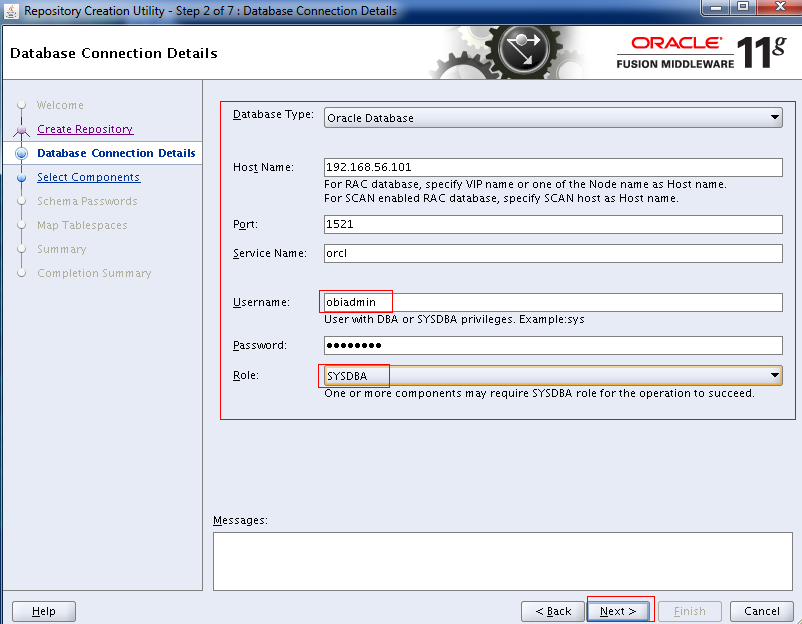
5.       Tạo user kết nối đến DB để tạo Repository Creation Utility
[root@ora1 data1]# su - oracle
[oracle@ora1 ~]$
[oracle@ora1 ~]$ sqlplus / as sysdba

SQL*Plus: Release 11.2.0.3.0 Production on Tue Sep 25 04:16:55 2012

Copyright (c) 1982, 2011, Oracle.  All rights reserved.


Connected to:
Oracle Database 11g Enterprise Edition Release 11.2.0.3.0 - Production
With the Partitioning, OLAP, Data Mining and Real Application Testing options

SQL>
SQL> create user obiadmin identified by Aa123456 account unlock;

User created.

SQL> grant sysdba to obiadmin;

Grant succeeded.

6.      Setup OBI Repository Creation Utility
[root@ora1 rcuHome]# cd /data2/softs/OBI/rcuHome/bin/
[root@ora1 bin]# ./rcu


7.      Setup Oracle BI EE
[oracle@ora1 bin]# cd /data2/softs/OBI/bishiphome/Disk1/
[oracle@ora1 Disk1]# ./runInstaller
[oracle@ora1 Disk1]# cd /data3/
[oracle@ora1 Disk1]# mkdir OBI


8.      Start/Stop BI Services
[oracle@ora1 bin]# vi /data3/OBI/user_projects/domains/bifoundation_domain/servers/bi_server1/security
[oracle@ora1 Disk1]# ./runInstaller
[oracle@ora1 Disk1]# cd /data3/
[oracle@ora1 Disk1]# mkdir OBI
Tạo file boot.properties trong thư mục /data3/OBI/user_projects/domains/bifoundation_domain/servers/bi_server1/security
Edit file và add 2 dòng sau:
username=weblogic
password=Password
Trong đó, Password là pass đã tạo cho user weblogic.
Copy file boot.properties vào thư mục /data3/OBI/user_projects/domains/bifoundation_domain/servers/AdminServer/security
Làm bước này để ko phải đăng nhập trong quá trình start/stop services
Scripts to stop/start Services:
File cấu hình biến môi trường (tham khảo)
export ORACLE_BASE=/data3/OBI
export ORACLE_HOME=$ORACLE_BASE/Oracle_BI1
export TNS_ADMIN=$ORACLE_HOME/network/admin
export ORACLE_SID=orcl
export PATH=$ORACLE_HOME/bin:$PATH

Toàn bộ scripts dùng để start/stop services
[root@GS-DW-APP2 scripts]# ll
total 3084
-rwxr-xr-x 1 oracle oinstall      79 Feb 29  2012 1_Start_WebLogic.sh
-rwxr-xr-x 1 oracle oinstall      54 Feb 29  2012 2_Start_Opmn.sh
-rwxr-xr-x 1 oracle oinstall      97 Feb 29  2012 3_Start_BI_Server.sh
-rwxr-xr-x 1 oracle oinstall      96 Feb 29  2012 4_Stop_BI_Server.sh
-rwxr-xr-x 1 oracle oinstall      53 Feb 29  2012 5_Stop_Opmn.sh
-rwxr-xr-x 1 oracle oinstall      78 Feb 29  2012 6_Stop_WebLogic.sh
-rwxr-xr-x 1 oracle oinstall     175 Mar  2  2012 BIenv
-rw------- 1 root   root     3112133 Sep 19 09:51 nohup.out
drwxr-xr-x 2 oracle oinstall    4096 Aug 22 23:55 PROD
-rwxr-xr-x 1 oracle oinstall      87 Mar  2  2012 Start_OBI_Services.sh
-rwxr-xr-x 1 oracle oinstall      84 Mar  2  2012 Stop_OBI_Services.sh

[root@GS-DW-APP2 scripts]# cat 1_Start_WebLogic.sh
sh $ORACLE_BASE/user_projects/domains/bifoundation_domain/bin/startWebLogic.sh
[root@GS-DW-APP2 scripts]# cat 2_Start_Opmn.sh
$ORACLE_BASE/instances/instance1/bin/opmnctl startall
[root@GS-DW-APP2 scripts]# cat 3_Start_BI_Server.sh
sh $ORACLE_BASE/user_projects/domains/bifoundation_domain/bin/startManagedWebLogic.sh bi_server1
[root@GS-DW-APP2 scripts]# cat 4_Stop_BI_Server.sh
sh $ORACLE_BASE/user_projects/domains/bifoundation_domain/bin/stopManagedWebLogic.sh bi_server1
[root@GS-DW-APP2 scripts]# cat 5_Stop_Opmn.sh
$ORACLE_BASE/instances/instance1/bin/opmnctl stopall
[root@GS-DW-APP2 scripts]# cat 6_Stop_WebLogic.sh
sh $ORACLE_BASE/user_projects/domains/bifoundation_domain/bin/stopWebLogic.sh
[root@GS-DW-APP2 scripts]#
[root@GS-DW-APP2 scripts]# cat Start_OBI_Services.sh
nohup ./1_Start_WebLogic.sh &
nohup ./2_Start_Opmn.sh &
nohup ./3_Start_BI_Server.sh &
[root@GS-DW-APP2 scripts]# cat Stop_OBI_Services.sh
nohup ./4_Stop_BI_Server.sh &
nohup ./5_Stop_Opmn.sh &
nohup ./6_Stop_WebLogic.sh &

Chỉ cần chạy script Start_OBI_Services.sh để start all services
Và script Stop_OBI_Services.sh để stop all services.
9.      Kiểm tra các services


-          Truy cập http://localhost:7001/em


Để bước đầu làm quen với  OBI, có thể tham khảo tutorial tại đây: